Hi! For some reason we can't display an ad here, probably because of an ad blocker. We have full respect if you want to run an ad blocker, but keeping this website and related softwares free depend on ads. We would appreciate if you add us to your white list or consider donating via Paypal. Thank you!
CPU-Z for Android is the mobile build of the CPUID system information tool; Windows users want the Windows edition instead.
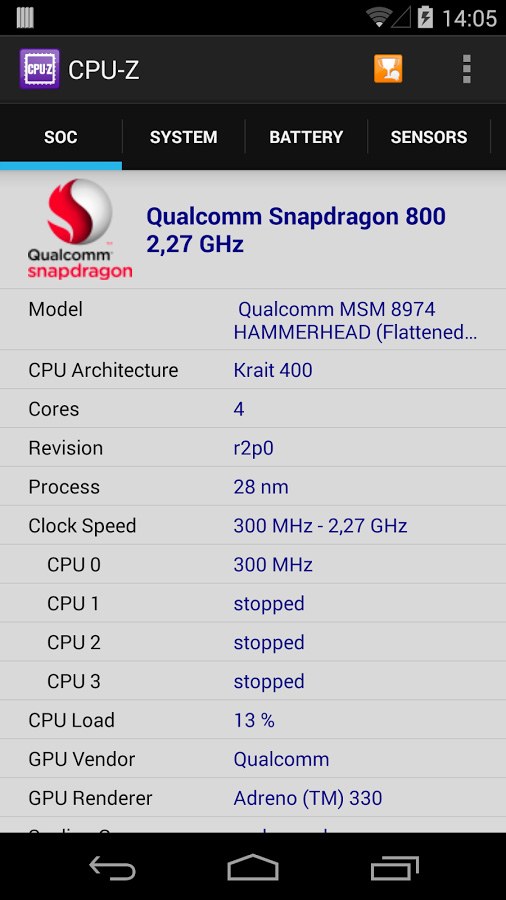
SoC (System On Chip) name, architecture, clock speed for each core ;
System information : device brand & model, screen resolution, RAM, storage.;
Battery information : level, status, temperature, capacity ;
Sensors.
MY ACCOUNT
Hi! For some reason we can't display an ad here, probably because of an ad blocker. We have full respect if you want to run an ad blocker, but keeping this website and related softwares free depend on ads. We would appreciate if you add us to your white list or consider donating via Paypal if ads really bother you. Thank you!
DOWNLOAD
Version 1.57 for android®
Fix white pages issue.
Fix intrusive ads issue.
ARM C1-Nano, C1-Pro, C1-Ultra, C1-Premium.
Google Tensor G3 (Zuma), G4 (Zuma Pro) and G5 (Laguna).
Qualcomm Snapdragon 8 Gen 5 and Snapdragon 8 Elite Gen 5.
Which permissions are required for CPU-Z and why ?
CPU-Z requires INTERNET permission for the online validation, and the billing permission for in-app purchase (see 2.).
2.
What is in-app purchase proposed by CPU-Z ?
CPU-Z proposed an in-application purchase to remove advertisement.
3.
CPU-Z consumes a lot of battery on my device.
That is due to the reading of the device's sensor (Sensor tab). You can disable the reading of sensors in the Settings page, by unchecking "Sensors".
4.
CPU-Z reports a wrong battery capacity.
CPU-Z relies on the operating system to report the battery capacity, and sometimes the system is wrong about it. From version 1.10, the battery capacity is
not reported anymore by default, you can restore it by checking "Battery Capacity" in the Settings page.
5.
How can I report a bug or a detection issue ?.
If CPU-Z closes abnormally, the settings screen will appear at the next run. You can use that screen to remove the main detection features of the application, and make it run.
In case of detection bug, please open the application menu and choose "Send Debug Infos" to send a report by email.